Google Nano Banana
Edit Your Images Easily with Gemini 2.5 Flash Image
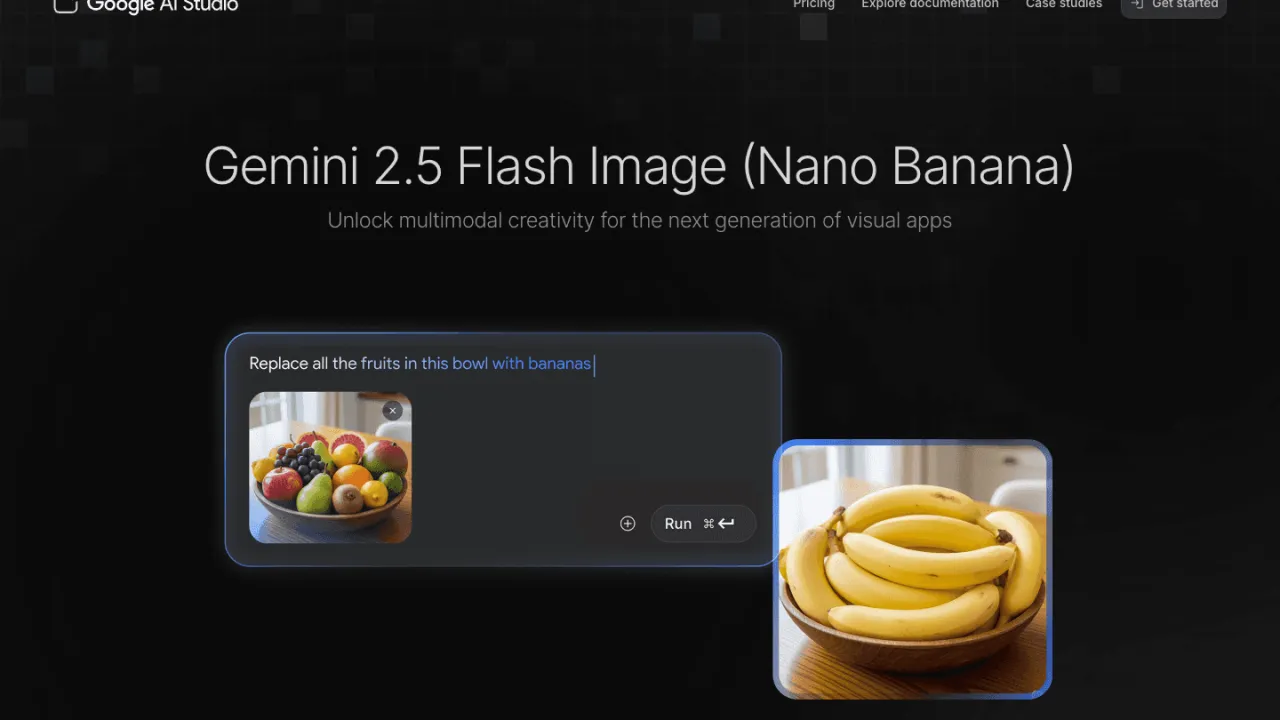
You spend hours in Photoshop modifying a simple background. You layer masks, adjustments, and effects. The final result? Rarely worth the time invested. Gemini 2.5 Flash Image (nicknamed "Nano Banana" by the community) completely changes this equation. This Google tool transforms image editing into natural conversation: "Change the background to a beach at sunset", and it's done in 3 seconds. No learning curve, no endless YouTube tutorials.
This article explores how Gemini 2.5 Flash Image revolutionizes visual creation. You'll discover its conversational editing capabilities, impressive character consistency handling, and how it positions against giants Midjourney and Adobe Firefly. Pricing, limitations, concrete use cases: everything you need to decide if this tool deserves your attention.
What is Gemini 2.5 Flash Image (Nano Banana): Google's conversational AI image editor
Gemini 2.5 Flash Image represents Google's approach to democratizing professional image editing. Officially launched on August 26, 2025, this multimodal model doesn't just generate images from text. It excels especially in iterative modification: you dialogue with the tool, progressively refine your vision, without ever losing the context of previous adjustments.
The "Nano Banana" nickname comes from internal Google code that leaked during early testing. The community immediately adopted it, to the point that Google now uses it in its own communications. Behind this playful name lies serious technical architecture: the model relies on Gemini 2.5 Pro for contextual understanding and integrates grounding capabilities via Google Search to generate factually accurate visuals.
The value proposition boils down to three words: speed, conversation, consistency. Generate an image in 3-5 seconds. Modify it twenty times while keeping the subject's visual identity. No need to configure masks or learn new software. Google clearly targets content creators, marketers and entrepreneurs who want professional results without investing in Adobe Creative Suite.
Adoption has been explosive. Early YouTube feedback shows impressive use cases: game developers generating complete sprite sheets, agencies transforming client selfies into product photos, designers testing dozens of packaging variations in minutes. The model now ranks among the most used on Google AI Studio.
How to edit an image with Gemini 2.5 Flash Image in 5 steps
- Access Google AI Studio (aistudio.google.com) or the Gemini application
- Select "Create image" mode and activate the Flash Image model
- Upload your base image or describe what you want to create
- Formulate your modification in natural language: "Replace background with misty forest"
- Refine iteratively: "Make fog denser", "Add sunray on left"
The real power appears in multi-turn editing. Unlike classic tools that reset context with each request, Gemini 2.5 Flash Image maintains complete modification history. You progressively build your vision without ever having to "start over" because an adjustment doesn't please you.
Pitfalls to avoid: overly vague prompts give generic results. "Change the mood" isn't enough. Prefer "Switch lighting to golden hour, increase contrasts, add warm dominant". The more precise you are about lighting, composition and style, the better the results.
Character consistency works remarkably well for simple modifications (changing outfit, background). It shows limits on radical transformations of viewing angle or pose. To maintain 85-90% visual identity through 10+ modifications, always start with a clear reference image of the subject, avoid abrupt lighting changes, and explicitly describe elements to preserve: "Keep exactly the same face, change only clothing".
The strengths of Gemini 2.5 Flash Image for your visual projects
Execution speed disrupts traditional creative workflows. Generating a variant takes 3-5 seconds versus several minutes on Midjourney or Stable Diffusion. This velocity transforms creative exploration: you test 20 different directions in the time a competitor would produce 3. Agencies exploit this speed for client presentations: showing 5 different concepts of the same campaign in real-time during meetings.
Competitive pricing makes the tool accessible to small structures. $0.039 per image via official Google API, 86% cheaper than Midjourney ($0.28/image on Standard plan). For occasional users, free access via Google AI Studio suffices to explore capabilities. Free quotas vary (Google doesn't communicate fixed numbers), but generally count 10-30 daily generations before switching to limits.
Multi-turn conversational editing eliminates the frustration of "starting from scratch". You refine progressively without losing previous adjustments. An indie developer testifies to creating 15 variations of a game character while perfectly maintaining visual identity, something impossible with classic tools without fine-tuning.
Google Search integration for factual grounding distinguishes Gemini 2.5 Flash Image. Request "Create infographic of iPhone sales in 2024", and the model searches real data before generating the visual. This capability remains limited (it sometimes makes factual errors), but opens use cases impossible with Midjourney or DALL-E that systematically invent figures.
Invisible SynthID watermark protects your creations without disfiguring the image. Unlike visible watermarks that ruin aesthetics, SynthID integrates at pixel level imperceptibly. You can verify image authenticity by uploading it to Gemini, but impossible to remove the watermark. This balance pleases companies wanting to track their assets.
What Gemini 2.5 Flash Image doesn't do (yet)
Consistency degenerates quickly beyond 15-20 successive modifications. Trustpilot users repeat it: "Nano Banana starts off following prompts reasonably well, but then struggles more and more as the chat progresses." This technical limitation forces restarting a new conversation for complex projects requiring 30+ adjustments.
Google censorship blocks many legitimate requests. The system regularly refuses innocent demands by excessive precaution. A video game creator reports having seen refused the generation of a character in medieval armor because the algorithm detected "violent content". Reformulating the prompt sometimes bypasses the problem, but this unpredictability frustrates during tight professional workflows.
Artistic quality doesn't rival Midjourney for stylized visuals. Gemini 2.5 Flash Image excels in photorealism and technical precision, but struggles to generate those cinematic atmospheres, subtle color palettes and bold compositions that make Midjourney's signature. If your project requires "concept art" or "editorial fashion" rendering, Midjourney remains superior.
Complete absence of affordable official API slows enterprise adoption. Google forces developers to go through Vertex AI with full Google Cloud billing. For a startup wanting to integrate image generation into its product, cost and administrative complexity become prohibitive. Third-party services like CometAPI partially fill this void, but add intermediary layer.
Unstable performance according to server load annoys. During usage peaks (evenings and weekends in Europe/America), generation times can triple and 429 "quota exceeded" errors multiply. This unpredictability complicates planning projects with tight deadlines.
How much does Gemini 2.5 Flash Image cost? Prices verified on 01/08/2026
Prices verified on 01/08/2026 on official Google AI Pricing page.
| Plan | Price | Main limits | Recommended use case |
|---|---|---|---|
| Free (AI Studio) | $0 | Variable quotas (10-30 images/day), 1024x1024 resolution, mandatory SynthID watermark | Exploration, learning, personal projects |
| Google API | $0.039/image | Pay-as-you-go, token billing (1290 tokens/image), requires Google Cloud account | Developers, product integrations, medium volume |
| Gemini Advanced | $19.99/month | Largely increased quotas, server priority, multi-device access | Professional creators, intensive daily use |
| Third-party services | From $13.9/month | Variable per provider (nanobanana.im, getimg.ai), often 2 free trial credits | Alternative to Google quotas, simplified UI |
The free plan via Google AI Studio perfectly suits testing capabilities and validating if the tool meets your needs. Quotas reset daily, but Google dynamically adjusts according to global load. Some users report 50+ free generations certain days, others only 10.
For regular professional use (social media content creation, client mockups, marketing assets), Gemini Advanced ($19.99/month) offers best value. You eliminate quota uncertainty and benefit from more stable generation times. An Instagram content creator generating 50 visuals per week easily amortizes the subscription.
Developers integrating image generation into their applications favor Google API at $0.039/image. Cost becomes predictable: for an app generating 10,000 images/month, count $390. This transparency simplifies business planning. Beware however of additional Google Cloud fees if you use other services (storage, compute).
Alternatives to Gemini 2.5 Flash Image on Retague
1. Midjourney
The undisputed king of aesthetics and atmosphere. Midjourney surpasses Gemini 2.5 Flash Image for artistic visuals, concept art, and any project requiring that "editorial" touch. The Discord interface repels some users, but results justify the learning curve. Plans from $10/month for 200 generations. Prioritize Midjourney if your priority is visual beauty rather than technical precision.
The quintessential professional solution for teams already invested in Creative Cloud. Firefly integrates natively with Photoshop, Illustrator and Adobe Express. Its huge advantage: trained exclusively on Adobe Stock, it eliminates any copyright risk. For agencies and companies where legal compliance prevails, Firefly is worth its price ($20-60/month depending on your CC plan). Editing capabilities remain less conversational than Gemini, but workflow integration compensates.
Conclusion: is Gemini 2.5 Flash Image worth it?
Gemini 2.5 Flash Image redefines professional image editing accessibility. The combination of speed (3-5 seconds), price ($0.039/image), and conversational approach makes it a formidable tool for content creators, marketers and entrepreneurs. Character consistency and multi-turn editing eliminate constant restart frustration.
Limitations exist. Excessive censorship frustrates, artistic quality doesn't rival Midjourney, and consistency degrades after 15+ modifications. For purely artistic workflows requiring cinematic atmosphere and bold compositions, Midjourney remains superior. For professional integration in Creative Cloud teams, Adobe Firefly offers more guarantees.
But for 80% of real use cases (product mockups, social media content, marketing variants, quick creative exploration), Gemini 2.5 Flash Image surpasses competition. Free access allows risk-free testing. If the tool meets your needs after one week of intensive use, Gemini Advanced subscription at $19.99/month quickly becomes profitable.
Ready to transform your visual workflow? Test Gemini 2.5 Flash Image for free. No credit card required for trial.
Appendix: Sources and verification links
Pricing and rates:
- Official pricing page:https://ai.google.dev/gemini-api/docs/pricing
- Vertex AI documentation: https://cloud.google.com/vertex-ai/generative-ai/pricing
- Verification date: 01/08/2026
Customer reviews:
- Trustpilot: 3.2/5 (340+ reviews) - https://www.trustpilot.com/review/gemini.google.com
- G2: General Gemini reviews (no dedicated Flash Image page)
- Capterra: No specific reviews available
Official documentation:
- Website: https://aistudio.google.com/models/gemini-2-5-flash-image
- API documentation: https://ai.google.dev/gemini-api/docs/image-generation
- Announcement blog: https://developers.googleblog.com/en/introducing-gemini-2-5-flash-image/
- SynthID watermark: https://ai.google.dev/gemini-api/docs/image-generation#synthid
Analyzed video review:
- Fireship - Gemini Flash 2.5 Review: Provided transcription
Retague alternatives: